 See this post for a guide on getting an embed code for audio uploads, and on resizing that embedded player.
Showing posts with label embed audio. Show all posts
Showing posts with label embed audio. Show all posts
Wednesday, 17 February 2016
USEFUL TECHNOLOGIES Soundcloud Divshare + embedding podcasts/MP3s
See this post for a guide on getting an embed code for audio uploads, and on resizing that embedded player.

Tuesday, 18 January 2011
Adding audio to your blog
I'm reposting this from the AS coursework blog
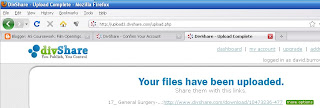 Basically, you need to create an MP3 file, upload this to a site which will give you an embed code- I suggest www.divshare.com - and then copy/paste in the embed code.
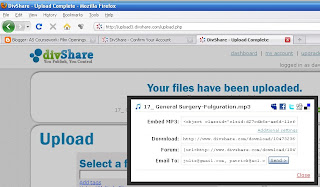 The two screenshots show you how this works; as with Scribd the upload is very simple; you now click on more options and you'll see the box in the 2nd screen shot appear - now just copy the embed code.
I'll test this out with a random music track...[14th Feb: changed this; must have mistyped the email adrs on the account sign up]
As you may well be using a video camera to record your audio, an alternative to extracting the audio track and putting it through GarageBand/iTunes is to add some relevant stills to the imported track within Final Cut (preferrably - try to start using this!), upload it to YouTube and use the embed code it generates. You're also then using additional new media for your project.
Open iTunes
Click 'iTunes' on the top menu
Click 'Preferences' from the drop-down list
Look under the General tab for 'import settings'
By default, iTunes will convert files to the aac format ... no good ...
So change this to mp3 from the drop-down menu
Quicker still, import an audio file into iTunes, click ADVANCED and select CONVERT TO MP3
UPDATE 18TH JAN 2011: Blogger provides a guide to audio/podcasting, including a set of links to several audio hosting/upload sites: http://www.google.com/support/blogger/bin/answer.py?hl=en&answer=80259
Also, if you copy a post from a group colleague you may find that the embedded audio in their post doesn't appear in yours - you simply need to copy/paste in the actual embed code again - to repost this post across 3 blogs, I had to go into the EDIT HTML tab, find that code and copy it.
 Basically, you need to create an MP3 file, upload this to a site which will give you an embed code- I suggest www.divshare.com - and then copy/paste in the embed code.
  The two screenshots show you how this works; as with Scribd the upload is very simple; you now click on more options and you'll see the box in the 2nd screen shot appear - now just copy the embed code.
I'll test this out with a random music track...[14th Feb: changed this; must have mistyped the email adrs on the account sign up]
As you may well be using a video camera to record your audio, an alternative to extracting the audio track and putting it through GarageBand/iTunes is to add some relevant stills to the imported track within Final Cut (preferrably - try to start using this!), upload it to YouTube and use the embed code it generates. You're also then using additional new media for your project.
How to convert your audio file to mp3
You can import your file into iTunes where you can convert it ... but you have to change some settings to do this.Open iTunes
Click 'iTunes' on the top menu
Click 'Preferences' from the drop-down list
Look under the General tab for 'import settings'
By default, iTunes will convert files to the aac format ... no good ...
So change this to mp3 from the drop-down menu
Quicker still, import an audio file into iTunes, click ADVANCED and select CONVERT TO MP3
UPDATE 18TH JAN 2011: Blogger provides a guide to audio/podcasting, including a set of links to several audio hosting/upload sites: http://www.google.com/support/blogger/bin/answer.py?hl=en&answer=80259
PROBLEMS WITH GETTING AN EMBED CODE - OR GETTING THE EMBED CODE TO WORK?
If you're struggling to generate an embed code its very likely because the file you've uploaded isn't an MP3! ALWAYS EXPORT AND USE MP3 FILES FOR PODCASTS!Also, if you copy a post from a group colleague you may find that the embedded audio in their post doesn't appear in yours - you simply need to copy/paste in the actual embed code again - to repost this post across 3 blogs, I had to go into the EDIT HTML tab, find that code and copy it.
Subscribe to:
Posts (Atom)